Table of Contents
ToggleA home theater media cabinet isn’t just furniture, it’s the command center for your entire entertainment setup. Whether you’re wrangling a tangle of HDMI cables, housing a collection of streaming devices, or displaying decades of media, the right cabinet organizes chaos and anchors your room’s design. But with options ranging from sleek wall-mounted units to sprawling floor models, picking the right one means understanding your gear, your space, and your skill level. Here’s how to find (or build) a media cabinet that actually works.
Key Takeaways
- A home theater media cabinet prevents equipment overheating, conceals cable chaos, and protects expensive gear from dust and damage—making it essential for any serious entertainment setup.
- Choose between freestanding units (more storage, easier to move) and wall-mounted cabinets (space-saving, modern look), each requiring different installation complexity and floor footprint.
- Prioritize adjustable shelves, proper ventilation with open-back designs or cooling fans, and adequate weight capacity (at least 50 pounds per shelf) to ensure your media cabinet handles current and future equipment.
- For IR remote compatibility, select tempered glass doors or mesh panels that allow infrared signals through, or invest in a $30-50 IR repeater system to avoid opening doors constantly.
- DIY builds offer total customization for odd dimensions and unique features, while pre-made options provide speed and consistency; hybrid approaches let you buy a basic unit and upgrade with custom touches like LED lighting and hardware swaps.
- Cable management through rear grommets, internal cable channels, and properly-mounted surge protectors keeps your media cabinet organized and prevents electromagnetic interference that degrades audio quality.
What Is a Home Theater Media Cabinet and Why You Need One
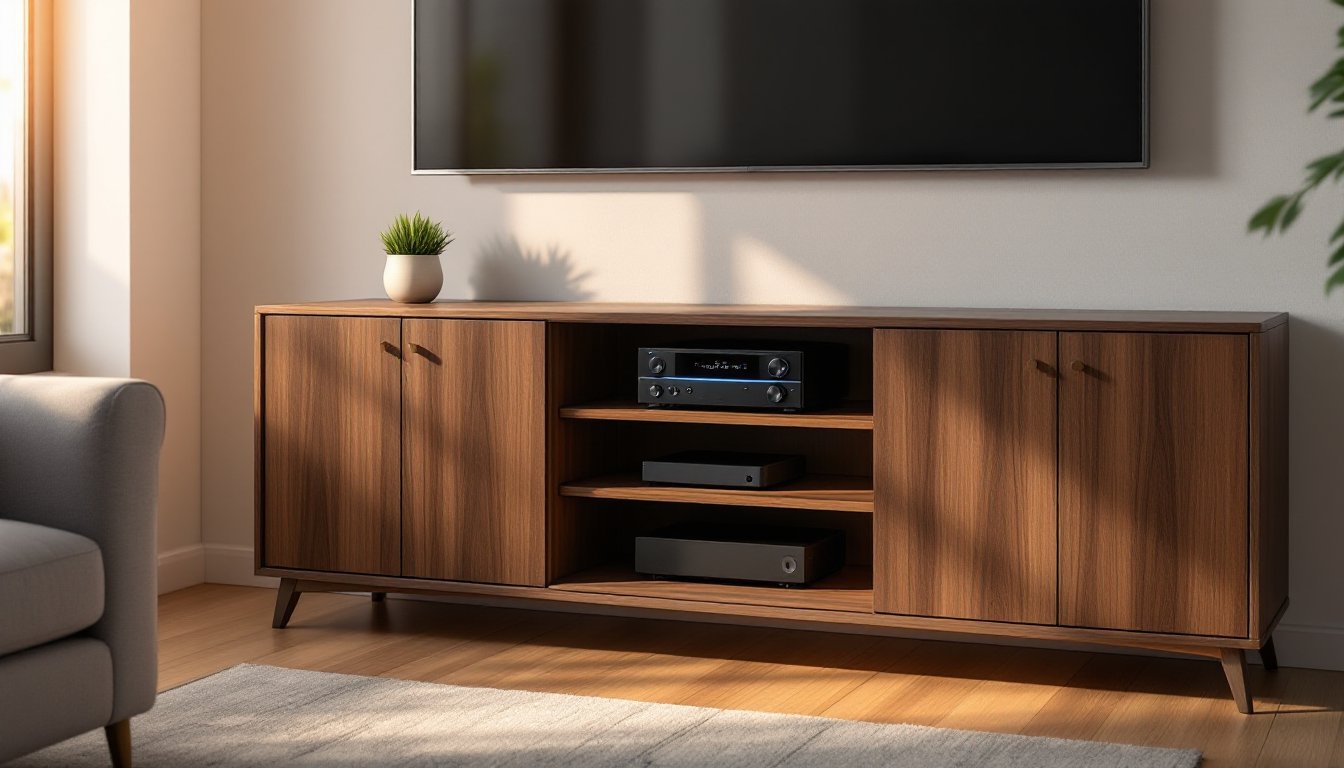
A home theater media cabinet is a piece of furniture designed to house and organize audio-visual equipment, think TVs, receivers, gaming consoles, Blu-ray players, and cable boxes, along with media collections and accessories. Unlike generic shelving, these cabinets are built with ventilation cutouts, cable routing channels, and adjustable shelves that accommodate everything from soundbars to center-channel speakers.
Why bother? Because entertainment gear generates heat, needs airflow, and comes with a rat’s nest of cables. A proper media cabinet prevents overheating (especially critical for AV receivers and game consoles), conceals wiring, and keeps remotes and controllers from vanishing into couch cushions. It also protects expensive equipment from dust, pet hair, and curious toddlers.
For renters or those in smaller spaces, a media cabinet offers flexibility that built-ins can’t. Move it when you move. Rearrange your layout without calling a carpenter. And if you’ve invested in a quality sound system, the cabinet can double as a stable platform for bookshelf speakers or a center channel, reducing vibration and improving acoustics.
Skip the cabinet, and you’re stuck with gear stacked on the floor, cables zip-tied to table legs, and that universal remote you swear was just right there.
Types of Home Theater Media Cabinets for Every Space
Media cabinets come in three main styles: freestanding floor units, wall-mounted consoles, and corner cabinets. Each has trade-offs in capacity, installation complexity, and room footprint.
Freestanding units are the workhorses. They range from simple open-shelf designs to closed cabinets with doors and drawers. Expect widths from 48 inches (compact) to 72+ inches (enough room for a full AV stack and vinyl collection). These sit directly on the floor and require no wall anchoring, though you should use furniture straps if you have kids or live in an earthquake zone. Look for units with a weight capacity of at least 150 pounds on the top surface if you’re placing a large TV there instead of wall-mounting.
Corner cabinets maximize awkward spaces and work well in smaller rooms or basement setups. They’re typically triangular or L-shaped, fitting snugly into a 90-degree corner. Trade-off: less linear display space for components, so you’ll need to stack or use the vertical shelves efficiently.
Wall-Mounted vs. Freestanding Media Cabinets
Wall-mounted (or floating) cabinets free up floor space and create a modern, minimalist look. They’re ideal for small apartments or rooms where you want to run a robot vacuum underneath without obstacles. Installation requires locating studs (typically spaced 16 inches on center) and using heavy-duty lag bolts or a French cleat system rated for the combined weight of the cabinet plus gear, plan for 200+ pounds total.
You’ll need a stud finder, a level, and a drill with a masonry bit if you’re going into concrete or brick. Most floating units span at least two studs for stability. If your wall is drywall over metal studs (common in condos), you’ll need toggle bolts rated for the load. Don’t eyeball it, improper mounting can rip drywall and dump expensive electronics.
Freestanding cabinets are plug-and-play by comparison. No drilling, no leveling across studs, and easier to move if you rearrange furniture. They also offer more storage volume, drawers for game controllers, cabinet doors to hide clutter, and adjustable shelves that accommodate everything from a turntable to a vintage VCR. Downside: they eat up floor space and can make a small room feel cramped.
Key Features to Look for When Choosing Your Media Cabinet
Start with dimensions and clearance. Measure your TV’s width (or the spot where you plan to mount it) and add at least 3 inches on each side for visual balance. Check the depth, most cabinets are 16 to 20 inches deep, which accommodates AV receivers and cable boxes without overhang. If you’re placing it in an alcove or between walls, measure the width at floor level and at the top: older homes aren’t always square.
Next, ventilation. Electronics generate heat, and stacking components in an enclosed space without airflow is asking for thermal shutdowns or shortened lifespan. Look for open-back designs or cabinets with ventilation grilles. If you’re buying or building a closed-back unit, consider adding a small 120mm PC cooling fan ($10-15) powered by a USB adapter to move air. Many enthusiasts adopt woodworking plans from sites like The Handyman’s Daughter to add custom vent holes during the build.
Adjustable shelves are non-negotiable. Component heights vary, an Xbox Series X is 12 inches tall, while a cable box might be 2 inches. Fixed shelves waste space and limit future upgrades. Shelves should rest on metal pins or clips, not glued-in place.
Check the weight capacity per shelf. Cheap particleboard sags under the weight of a heavy receiver or gaming PC. Look for shelves rated for at least 50 pounds each. Solid wood, plywood, or MDF with a thickness of ¾ inch holds up better than ½-inch particleboard with a veneer.
Finally, door style matters if you use IR remotes. Solid wood or metal doors block infrared signals, forcing you to open them every time you change the channel. Tempered glass doors or mesh-front panels let IR pass through. Alternatively, install an IR repeater system, a $30-50 kit with a sensor that mounts outside the cabinet and emitters that stick to each component.
Storage and Cable Management Solutions
Cable chaos is the enemy. A good media cabinet includes rear cutouts or grommets for routing HDMI, power, speaker wire, and Ethernet cables. Rubber grommets (around 2-3 inches in diameter) protect cables from sharp edges and keep the look clean.
For DIYers, drilling your own cable holes is straightforward: use a spade bit or hole saw on a drill, going slow to avoid tearout on the veneer. Drill from the back if possible, or score the veneer with a utility knife first. Space holes near the back corners so cables drop behind the cabinet, not in the middle where they’re visible.
Internal cable management gets trickier. Use adhesive-backed cable channels or hook-and-loop straps (not zip ties, they’re permanent and a pain during upgrades) to bundle and route cables along the cabinet’s interior sides. Run power cables separately from HDMI and speaker wire to avoid electromagnetic interference, especially if you’re running unshielded cables.
Some premium cabinets include a power management drawer or built-in surge protector. If yours doesn’t, mount a surge protector inside the cabinet using the keyhole slots on its back, or attach it with heavy-duty Velcro. Keep the power strip accessible, you’ll need to reset it eventually.
Design and Style Options to Match Your Home Decor
Media cabinets come in styles from mid-century modern to farmhouse industrial. The key is matching the material and finish to your existing furniture without making the cabinet a focal point that competes with the screen.
Wood finishes, walnut, oak, cherry, bring warmth and work well in traditional or transitional spaces. Darker stains (espresso, tobacco) hide fingerprints and scratches better than light finishes. If you’re going for a rustic or farmhouse look, consider reclaimed wood or distressed finishes, but avoid anything too busy that draws the eye away from your display.
Painted cabinets in white, gray, or matte black fit modern and minimalist interiors. White reflects light and makes small rooms feel larger, but shows dust and scuffs. Matte black is forgiving and pairs well with black TV bezels for a monolithic look. Avoid high-gloss finishes, they show every fingerprint and reflect screen glare.
Metal and glass cabinets suit contemporary or industrial spaces. Tempered glass shelves feel light and open, but show dust and require frequent cleaning. Steel or aluminum frames are durable but can feel cold unless balanced with wood accents. According to reviews on Digital Trends, tempered glass is also popular in open-concept layouts where you want gear visible but organized.
Open vs. closed storage is part aesthetic, part practical. Open shelves display collectibles, vinyl records, or color-coordinated media, but gather dust and expose equipment. Closed cabinets with doors hide clutter and create a cleaner look, ideal if your living room doubles as a guest space. Sliding barn doors or soft-close hinges add function and a touch of style without hardware protruding into walkways.
Consider the hardware, handles, knobs, or touch-latch doors. Brushed nickel and matte black are timeless. If you’re buying unfinished furniture or building your own, swapping out hardware is an easy upgrade that costs $3-8 per pull.
DIY vs. Pre-Made: Which Home Theater Cabinet Is Right for You?
Pre-made cabinets are the fast lane. Assemble with a screwdriver, level it, load your gear, and you’re watching movies by dinner. Prices range from $150 for basic particleboard units to $1,200+ for solid hardwood or designer pieces. Big-box stores stock standard sizes: online retailers offer more variety but require careful measurement, returns are a hassle when it’s a 70-inch cabinet.
Pros: Speed, consistent quality, often include pre-drilled cable holes and adjustable shelves. Cons: Limited customization, and cheaper units use thin materials that bow under weight. Read reviews carefully, on Tom’s Guide and similar sites, users often flag quality issues with specific models before you buy.
DIY builds offer total control: custom dimensions, perfect fit for your gear, choice of wood species, and the satisfaction of making something that doesn’t come in a flat-pack. A basic media cabinet can be built with a circular saw, drill, pocket-hole jig, and about $100-200 in materials (depending on wood choice). Plans are widely available online, and you can adapt them for exact shelf heights, integrated lighting, or hidden compartments.
DIY makes sense if you have odd dimensions to work with, like a narrow wall niche or an angled basement corner, or if you want specific features like a lift mechanism for a hidden TV or pull-out shelves for components. It also lets you match existing trim, stain, or custom paint colors.
Downside: Time and skill. Expect 8-12 hours for a straightforward build, more if you’re learning as you go. You’ll need space to work, and mistakes in cutting or joinery mean wasted material. If you’ve never built furniture, start with a simpler project before tackling a multi-shelf cabinet with doors.
Hybrid approach: Buy a basic pre-made unit and customize it. Add trim, swap hardware, paint or stain, drill additional cable holes, or install LED strip lighting inside. This splits the difference, leveraging the structure and speed of a ready-made piece while adding personal touches. A $300 cabinet plus $50 in upgrades can rival the look of a $700 designer unit.
If your setup includes expensive or heavy equipment (a high-end AV receiver, vintage turntable, gaming PC), prioritize stability and weight capacity over aesthetics. A sagging shelf or tipping cabinet can cost you more than the furniture itself.